from sklearn.cluster import KMeans

# pip install scikit-learn
import numpy as np
from PIL import Image

# Define the number of colors to extract
n_colors = 5

image_path = (
    input("选择图片:") or r"D:\Download\8f.jpeg"
)
img = Image.open(image_path)

# Convert image to RGB array
img_array = np.array(img)
img_array = img_array.reshape((img_array.shape[0] * img_array.shape[1], 3))

# Use KMeans clustering to find most dominant colors
kmeans = KMeans(n_clusters=n_colors)
kmeans.fit(img_array)

# Get the RGB values of the centroids
centroids = kmeans.cluster_centers_

# Count the number of pixels associated with each cluster
histogram = np.histogram(kmeans.labels_, bins=n_colors, range=(0, n_colors))

# Calculate the percentage of each color
percentages = (histogram[0] / img_array.shape[0]) * 100

# Sort colors by percentage in descending order
sorted_indices = np.argsort(percentages)[::-1]
sorted_centroids = centroids[sorted_indices]
sorted_percentages = percentages[sorted_indices]

colors_list = []
# Print the dominant colors and their percentages in descending order
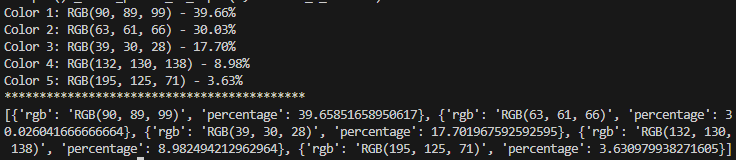
for i in range(n_colors):
    color_info = {}
    color_info[
        "rgb"
    ] = f"RGB({sorted_centroids[i][0]:.0f}, {sorted_centroids[i][1]:.0f}, {sorted_centroids[i][2]:.0f})"
    color_info["percentage"] = sorted_percentages[i]
    colors_list.append(color_info)
    print(
        f"Color {i + 1}: RGB({sorted_centroids[i][0]:.0f}, {sorted_centroids[i][1]:.0f}, {sorted_centroids[i][2]:.0f}) - {sorted_percentages[i]:.2f}%"
    )

print("*******************************************")
print(colors_list)